
Agentic Browsers and Meta-ExternalAgent: What to Block Before Meta's 20 November Terms
Transfon Team
6 min read


AI agents that browse like people are now filling in forms, logging in and reaching checkout on publisher, e-commerce and SaaS sites, and most of them never say they are bots. At the same time, Meta's new terms let it crawl the sites of any business that keeps advertising with it after 20 November. Transfon Security gives you one place to see this traffic and decide what gets through.
What changed
- Agentic browser traffic grew 4.7x in September, according to an industry report covered by Help Net Security on 19 October. Meta's new Muse agent made 29 million requests in its first 12 days, almost all from cloud servers, and about 9% went to login, payment and form pages.
- Meta's crawlers are about half of all AI bot traffic.
- Meta's revised Commercial Terms take effect on 20 November 2026. If you keep using Meta ads, you agree that Meta can crawl sites linked to your business. The European Publishers Council has warned that robots.txt is no substitute for contract terms.
Our June post on AI spiders covered crawlers that announce themselves. This is the next step.
Why blocking bots by name no longer works
Most AI bot controls rely on a bot's name and on robots.txt. Agentic browsers skip both. They look like an ordinary visitor's browser, act on behalf of a real user, and visit only a few pages per task, so they blend in with your customers.
What gives them away is everything else: they run from cloud servers rather than home or mobile connections, they go straight to forms and checkout, and they move at machine speed. That is exactly what Transfon Security looks at.
How Transfon Security handles agentic browsers and Meta crawlers
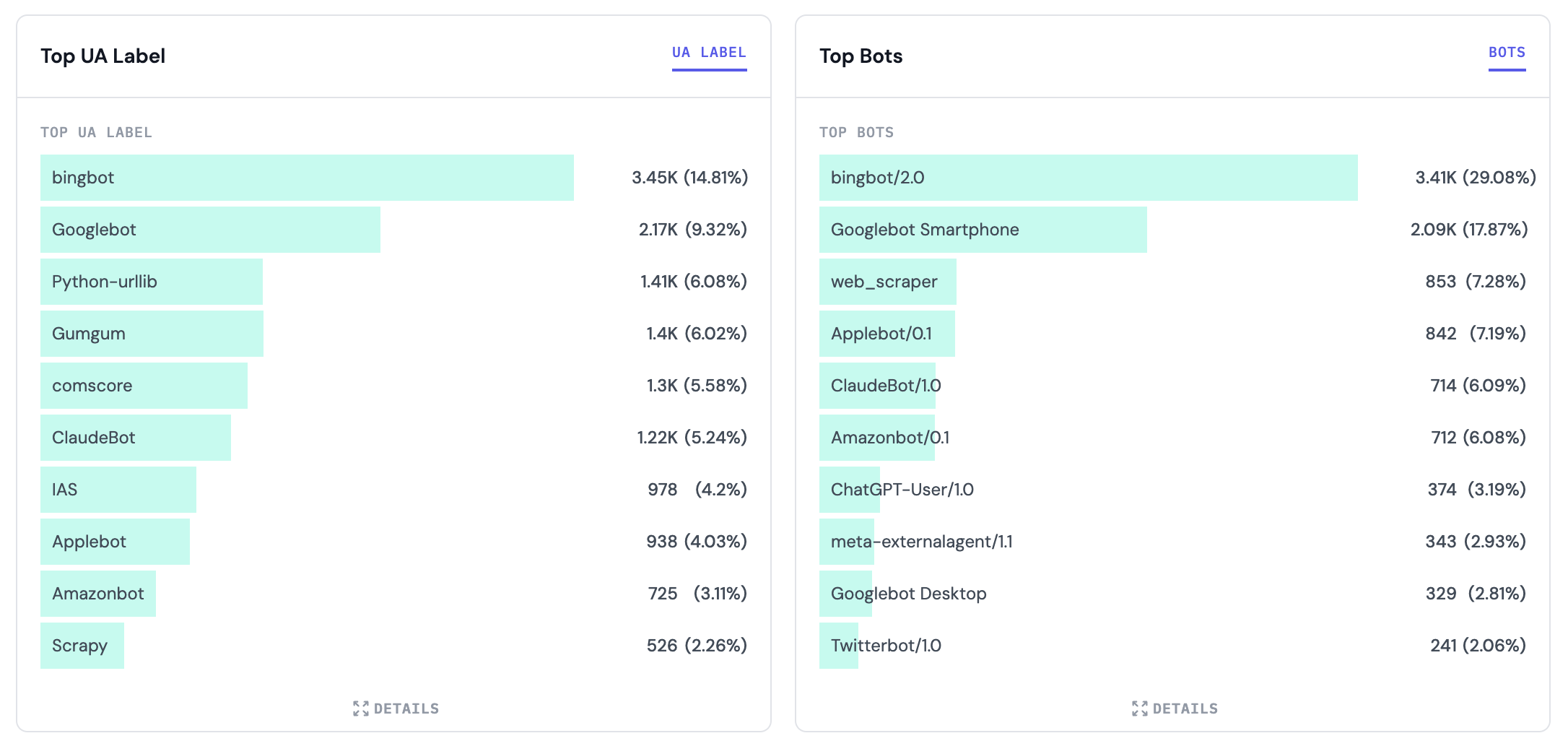 Transfon Security traffic dashboard showing bots by user agent
The Transfon Security dashboard breaks traffic down by bot, network and data center.
Transfon Security traffic dashboard showing bots by user agent
The Transfon Security dashboard breaks traffic down by bot, network and data center.
See who is really on your site
The Traffic Analytics dashboard shows every visitor by bot name, network and data center. You can see at a glance how much of your login, sign-up and checkout traffic comes from cloud servers instead of real customers, and how much each Meta crawler is taking.
Spot agents that hide their identity
Every request is checked for where it comes from (cloud, proxy, VPN or Tor), whether the browser is what it claims to be, and how fast and where it moves. An undeclared agent can copy a browser's name, but it can't hide that it runs from a data center and goes straight to your payment page.
Protect forms, sign-ups and checkout
Keep your content open while putting a closer check on the pages that matter. Transfon Security can block or rate-limit suspicious sessions on login, registration and payment pages, or flag them so your site asks for an extra verification step. Real customers check out without friction, while fake sign-ups and card testing are stopped.
Control Meta crawlers on your terms
Allow the Meta crawler that builds your link previews, limit the ones that index or collect content for AI, and keep all of them away from accounts and checkout. Transfon Security also blocks bots that pretend to be Meta by checking that the traffic really comes from Meta's network.
Test before you block
Every rule can run in Monitor mode first. You see exactly what would have been blocked, then switch it on when you are confident. No guesswork, no lost customers.
What to allow, limit or block
| Traffic | Content pages | Login and sign-up | Checkout |
|---|---|---|---|
| Search engines (Google, Bing) | Allow | Allow | Allow |
| Meta link previews (facebookexternalhit) | Allow | Allow | Allow |
| Meta AI search and ads crawlers (meta-webindexer, meta-externalads) | Allow with a limit | Block | Block |
| AI training crawlers (meta-externalagent, GPTBot, ClaudeBot) | Your choice | Block | Block |
| Fake "Meta" bots from other networks | Block | Block | Block |
| Agentic browsers from cloud servers | Allow and watch | Limit and verify | Verify or block |
| Real visitors from home and mobile networks | Allow | Allow | Allow |
Every row is a ready-to-use rule in Transfon Security. Online stores that want AI shopping agents to place orders can loosen the checkout column. SaaS products usually tighten sign-up, where fake trials begin.
If you advertise on Meta
- Decide what Meta can use. Link previews only, previews plus Meta AI search, or everything.
- Record that choice in robots.txt, so your preference is on file.
- Enforce it with Transfon Security. Limit the crawlers you allow, block the rest, and keep all of them off account and payment pages.
- Handle undeclared agents separately. Meta's Muse agent does not use a Meta crawler name, so only network and behaviour rules catch it.
Ask your legal team to review the new terms before 20 November. Blocking a crawler is a technical control, not a contract change.
Built for publishers, online stores and SaaS
- Publishers: keep AI crawlers from taking your content and server capacity while staying visible in search and AI answers.
- E-commerce: stop card testing, account takeover and automated checkouts without slowing real shoppers.
- SaaS and APIs: rate-limit automated sign-ups and API abuse from cloud servers per endpoint.
- Advertisers: keep bot clicks and agent visits out of your campaign data.
FAQ
What is meta-externalagent?
It is the Meta crawler that collects public web pages to train Meta's AI models and index content for its products. Transfon Security lets you block it or limit how often it visits.
Is meta-externalagent the same as facebookexternalhit?
No. facebookexternalhit builds the preview card when someone shares your link on Facebook, Instagram or WhatsApp. Keep it allowed. Blocking meta-externalagent does not affect your previews.
What is an agentic browser?
A browser controlled by an AI agent instead of a person. It opens pages, fills forms and completes tasks for a user. Examples include Meta's Muse, ChatGPT's agent browsing (which absorbed OpenAI's Atlas) and Perplexity's Comet.
How do I block AI crawlers?
robots.txt asks crawlers to stay away but can't enforce it, and agentic browsers ignore it. Transfon Security enforces your choice at the edge, by bot name for declared crawlers and by network and behaviour for agents that hide.
Get started
Plans start at $200 a month for up to 2 million pageviews. See plans and pricing.
- Start a free 14-day trial and see your AI agent and crawler traffic within minutes. No credit card required.
- Talk to our team before 20 November if you advertise on Meta and want help choosing what to allow.
Transformation Strategies for Publishers and Marketers
Data Privacy and Security, Performance and User Experience, Regulation Compliance, User and Revenue Growth
Stay ahead of the publishing curve
Privacy, security, monetization, and performance insights. A few emails a month, no spam.